Overview
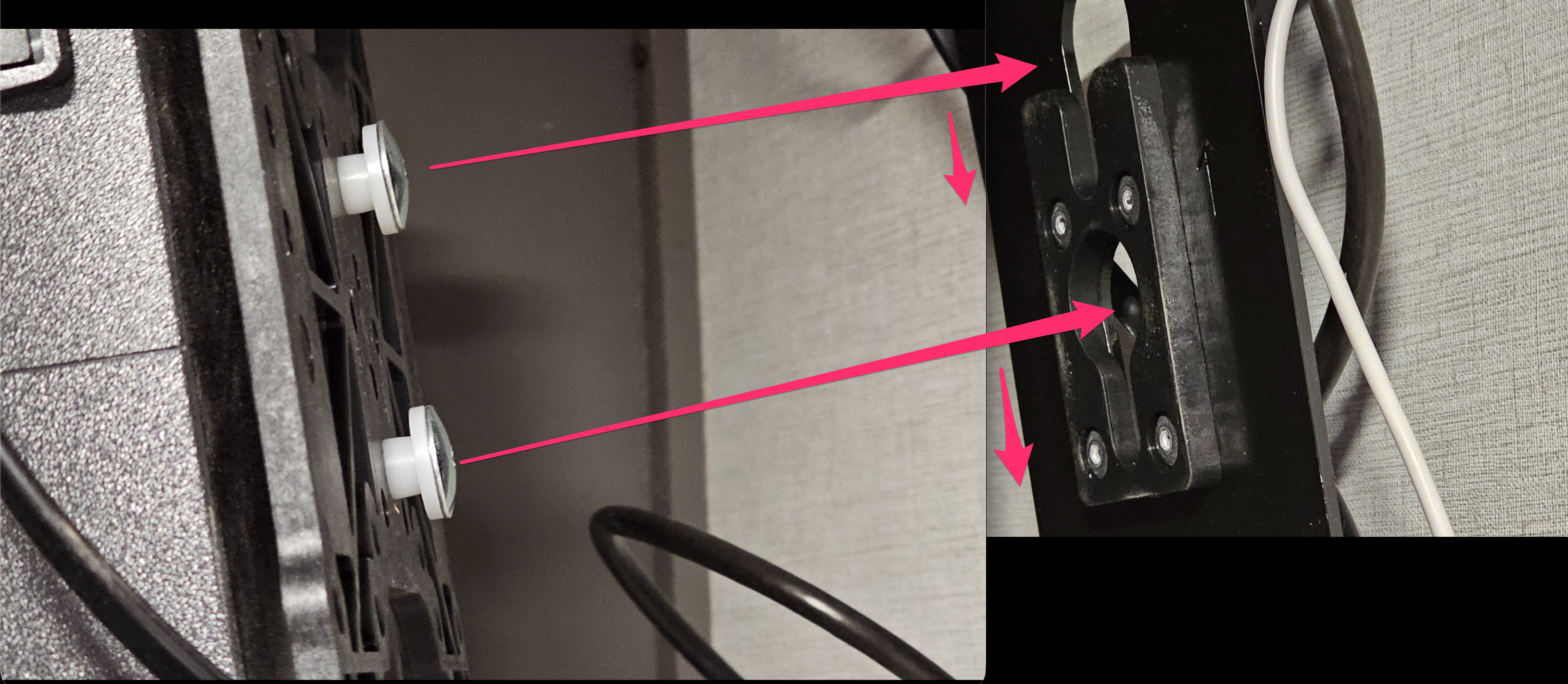
The bedroom television in the 2026 Alliance Paradigm 310RL is attached to the wall using a mounting bracket that allows the TV to be lifted off without removing any screws.
The mounting mechanism isn’t immediately obvious, especially since there is very little room to see behind the television.
After a little experimentation, I discovered that removing the TV is actually quite simple.
Removing the TV
- Support the top of the TV. Place one hand along the top edge of the television to stabilize it and prevent it from tipping forward.
- Lift from the bottom. With your other hand, grasp the bottom edge of the television and gently lift upward.
- Release the mounting bracket. Continue lifting until the television disengages from the wall-mounted bracket.
- Carefully move the TV away from the wall. Once released, support the television with both hands and slowly move it forward.
- Disconnect any cables. If you need to completely remove the television, disconnect the power and any other connected cables.
Reinstalling the TV
To reinstall the television, align the mounting hardware on the back of the TV with the wall bracket.
Carefully lower the television into position, ensuring that the mounting hardware is properly seated and secured before releasing it.
Tips
- No tools were needed to remove the TV in my 2026 Paradigm 310RL.
- Avoid pulling the TV straight outward before releasing the bracket.
- Keep one hand supporting the television while lifting to prevent it from tipping.
- Be mindful of the cables connected behind the television.
- If the TV doesn’t release with gentle upward pressure, stop and inspect the mount for a locking mechanism rather than forcing it.
Note: This procedure was confirmed on a 2026 Alliance Paradigm 310RL. Other model years or floor plans may use different mounting hardware.